Sage
The coordinator
Balances work across workers and worker units, prepares briefs, follows up requests and promises, and suggests what needs attention.
Turn customer enquiries into owned next steps, timely follow-ups and recorded outcomes. Corvair’s AI Harness gives virtual workers, bots and AI assistants the shared context, coordination and governance to carry the work through, with your sales team in control.
Walk through the productAn AI bot or assistant can answer a question or draft a message. Following a sales opportunity through also needs memory, permissions, a next action, someone accountable and a way to confirm what happened. That is what the AI Harness coordinates.
Use Corvair’s virtual workers and bring your own AI assistant or coworker through MCP. The harness supplies the operating structure: shared account context, approved playbooks, controlled access to systems, decision owners and follow-through.
For a quotation follow-up, that means remembering what was offered, checking when contact is allowed, handling the reply, routing a price exception and tracking the agreed action to its due time. Your company’s objectives, the account team’s priorities and the customer’s needs stay in view.
A customer can change channels, a rep can change shifts and a request can need approval. The work keeps its context, owner and next step. Your team spends less time reconstructing conversations and coordinating routine follow-up.
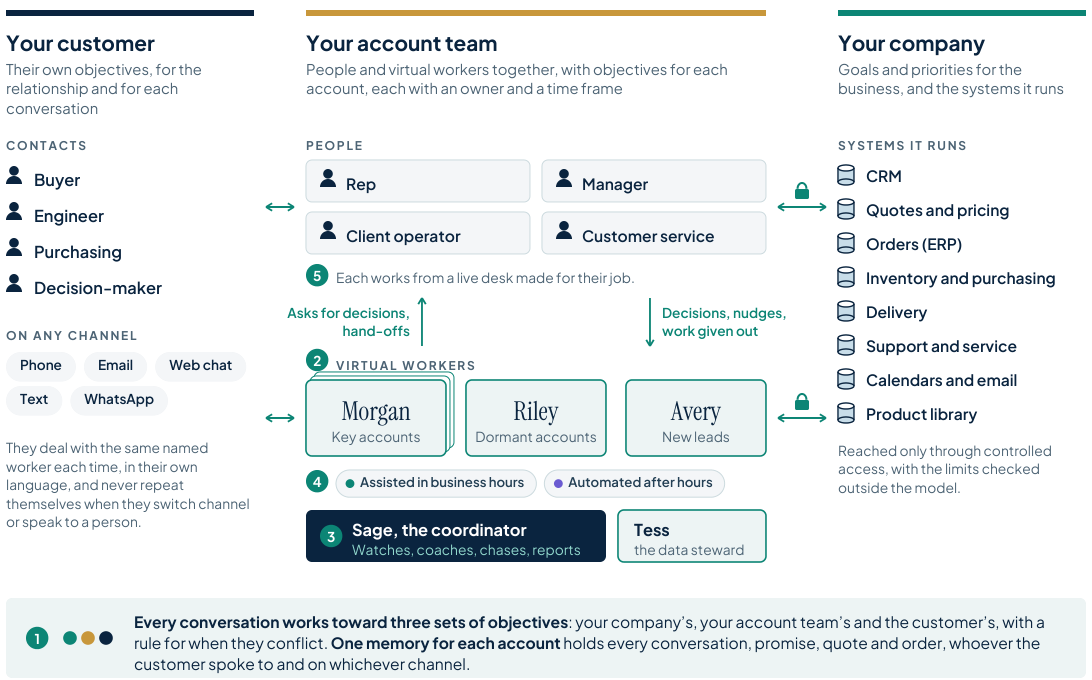
Conversations, promises and next steps stay with the account as channels and people change.
Company permissions and rules govern contact, prices, commitments and connected-system updates.
Your team decides what to delegate, what needs approval and when to guide, take over or stop the work.
Customer-facing workers handle the conversations. Internal agents support your people and those workers, each with a distinct job and defined authority.
Balances work across workers and worker units, prepares briefs, follows up requests and promises, and suggests what needs attention.
Checks and loads files, reuses column mappings, proposes loading rules and returns rejected rows with a reason.
Supports Operations and the Deal Desk by pricing and checking proposals, preparing renewals and answering questions about deals the person may access.
Sage, Tess and Dex are default names. Your company can name its own internal agents.
Requests and commitments stay visible, with the responsible person, expected time and context. Reminders, backup owners and escalation help the team follow through.
A live desk is the working environment for your role. Calls, conversations, worker requests, decisions and account context stay together. Full records open alongside the active work, so you can investigate without losing the call or thread.
Answer a customer call, consult the account and resolve a worker’s pricing request.
See the team’s work, listen or join where permitted, and handle decisions that need a manager.
Handle worker issues, data loads and commercial work. Dex supports proposal checks and renewal preparation.
Make and take calls in the browser. Mute, hold, use the keypad or transfer, with the call guide, account information and permitted live transcript beside the conversation.
Move from the call to its wrap-up and next steps in the same working environment. Recording and transcription follow the configured channel and country rules.

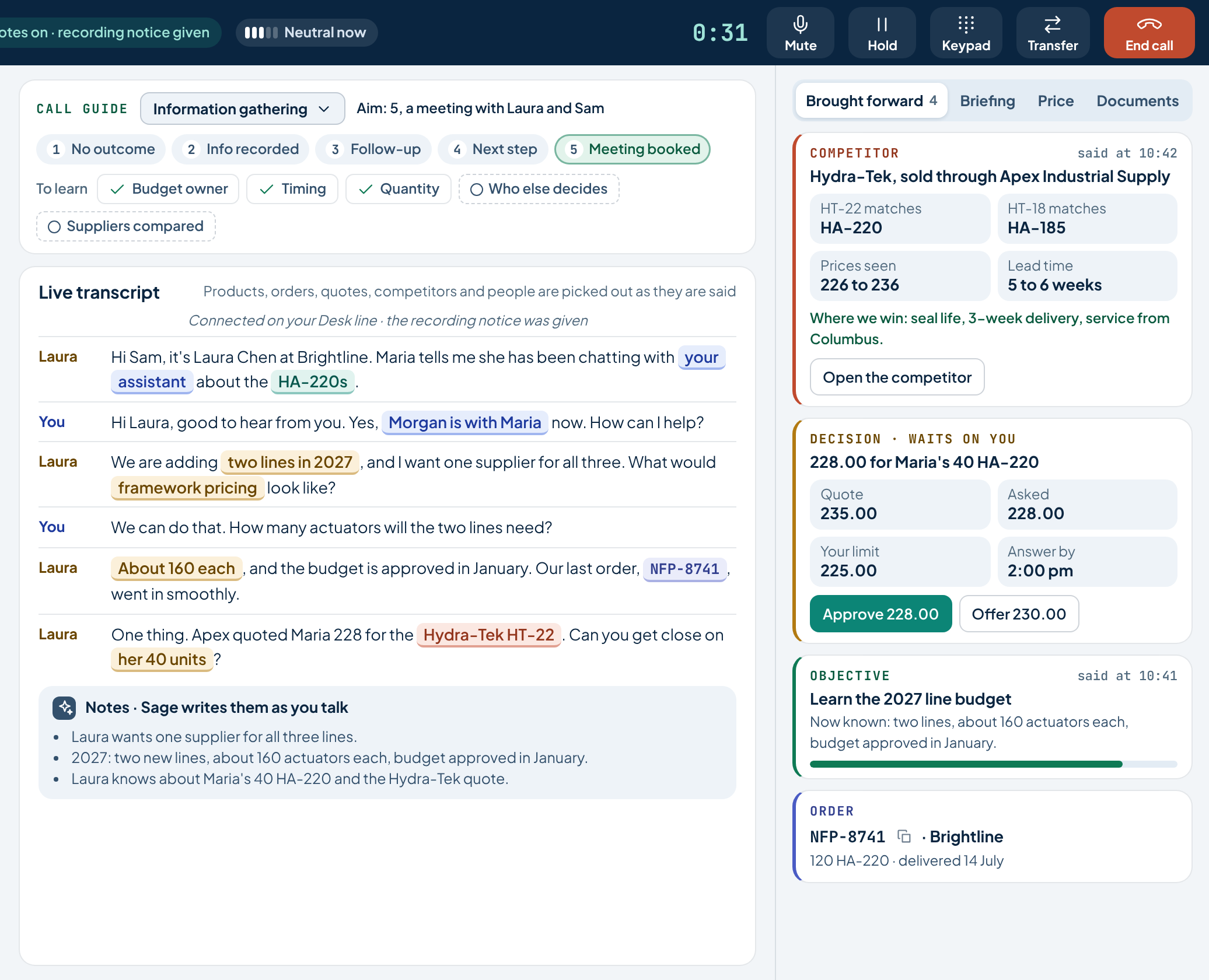
Start with a brief. Decide what needs your judgment. Guide a worker or join a conversation, with the account context already in view.
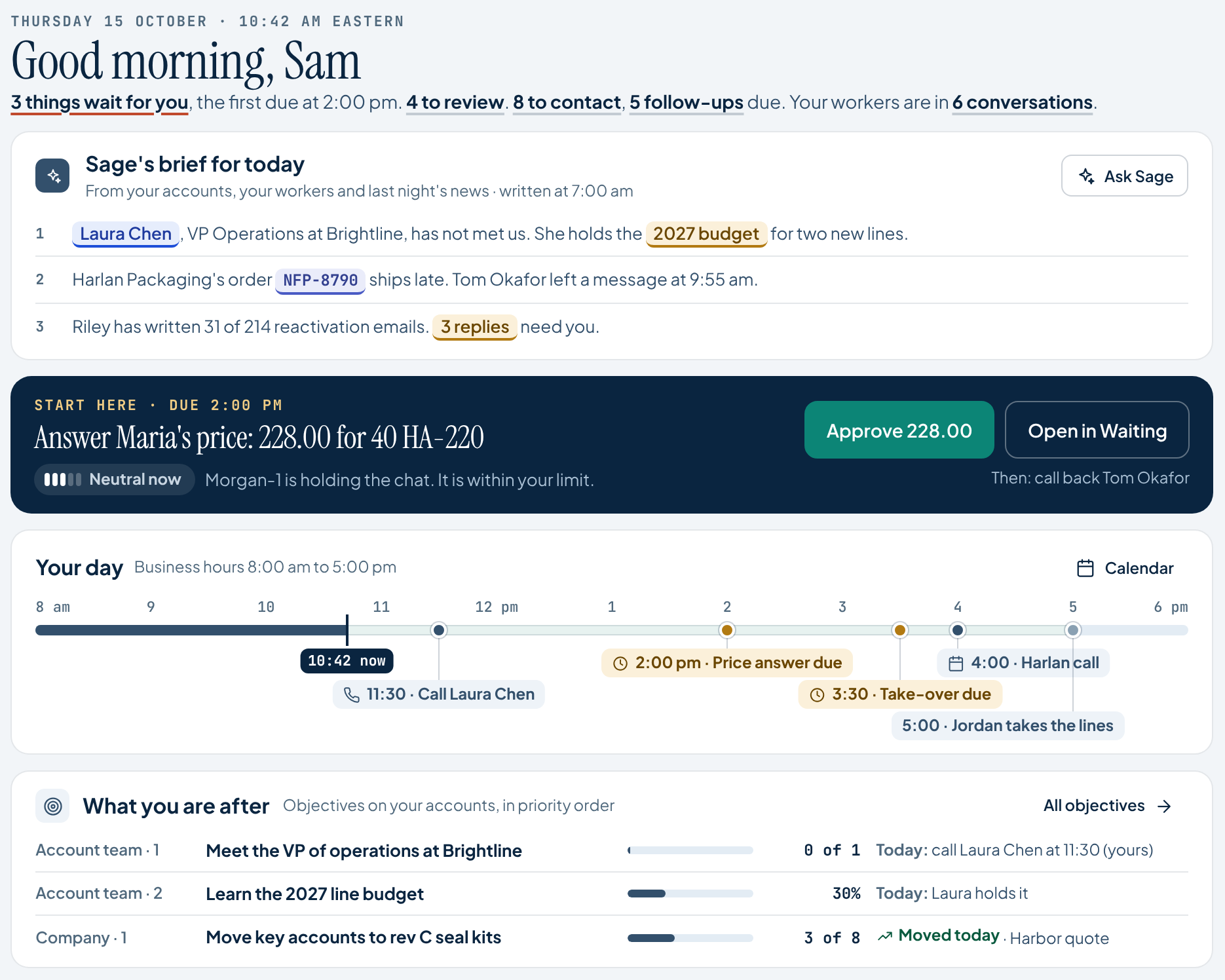
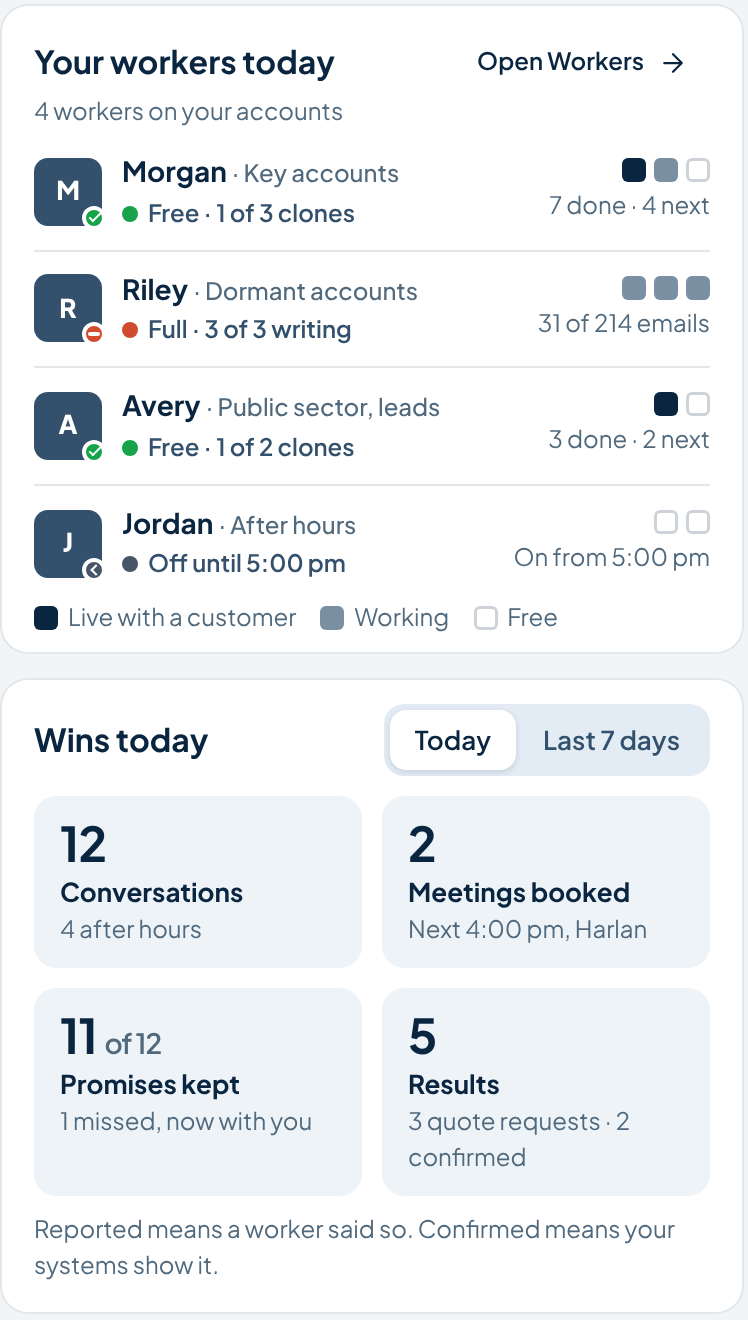
Sage brings the day’s account context and waiting decisions into view.
Named workers carry the follow-up. Your people handle the decisions that need them.
See the conversation, the next step and the promises made to the customer.
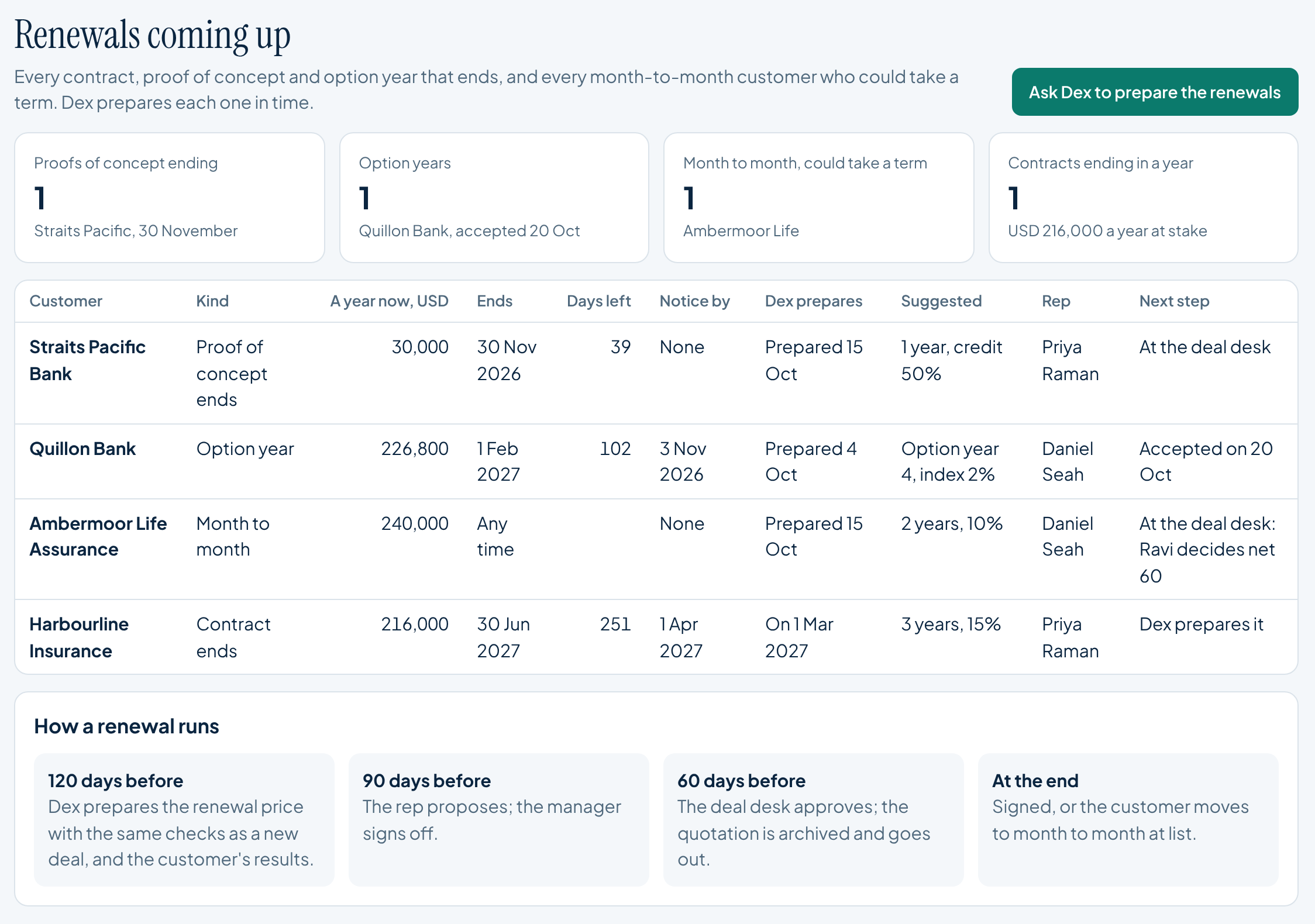
Bring upcoming renewals into view. Dex helps prepare the commercial work, with proposals, pricing and approvals owned by the right people.
Reps and managers also have shared Deal Desk views for proposals and quotations. The Operations renewal view appears for users with Deal Desk access.
A role pack defines the worker’s objectives, the situations it handles, the steps it follows, its playbooks and the outcomes it records. Playbooks are one part of the pack.
Objectives, situations, steps, playbooks and evaluation material.
Your accounts, product knowledge, formulas and system mappings.
Permissions, limits, supervisors and approval owners.
For example: account follow-up, enquiry handling or campaign work. These illustrate roles, rather than a catalogue of released packs.
Shape a tested way of working around your business rather than writing every instruction from scratch.
Version, review and test changes before moving a team to a new pack.
A pack describes how work is done. Your company separately controls what the worker may access, do and approve.
Bring your qualification method, call guides and responses to common objections. Shape how workers help your team sell, with the right questions, approved materials and clear points to involve a person.
Follow a playbook in actionConfirm the use, timing and people involved.
Use the product details, quotation and relevant materials.
A price exception or a new commitment goes to its owner.
Keep the follow-up moving across the customer’s chosen channels.
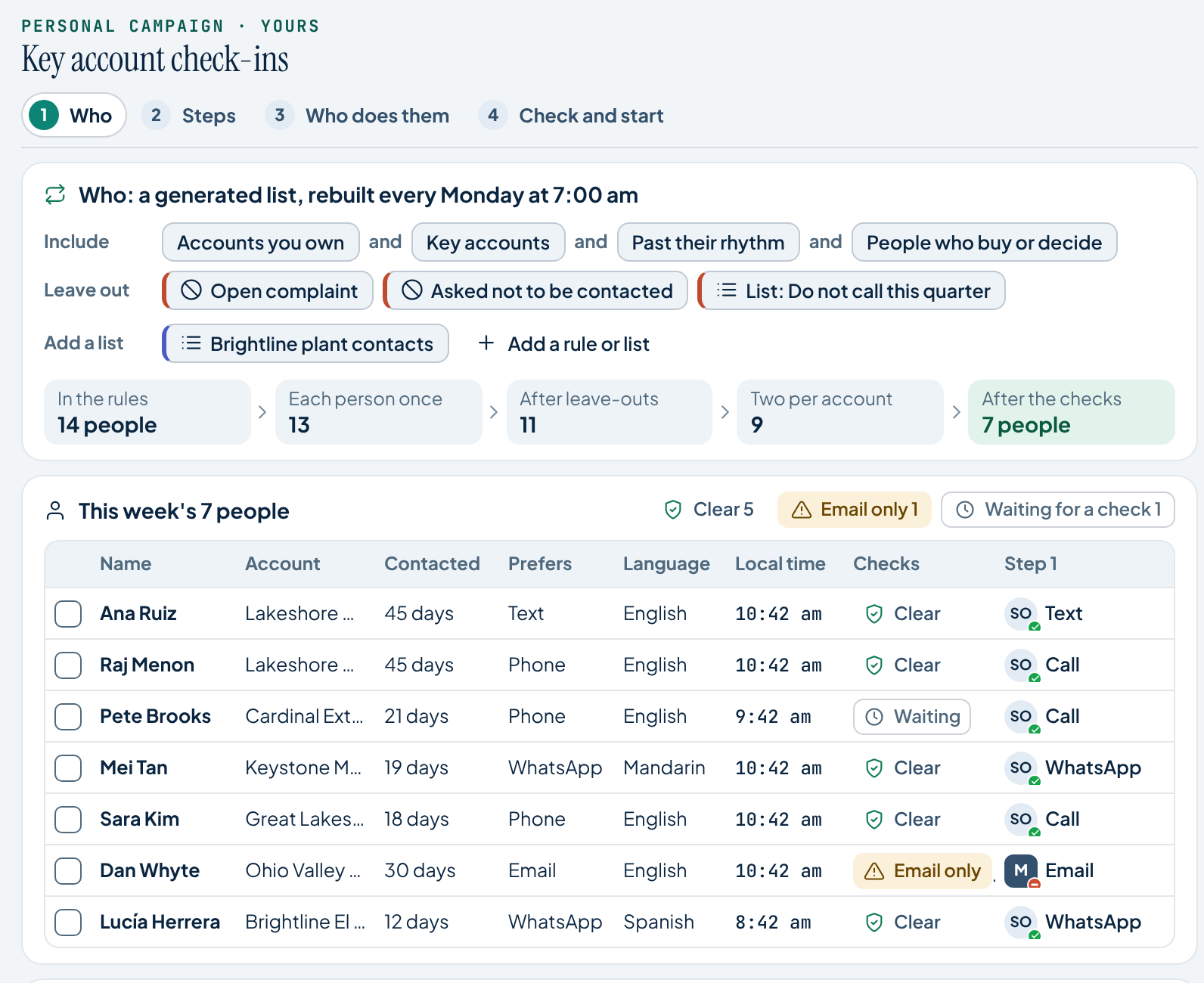
Win back quiet accounts, follow up an event or introduce a product. Your team sets the direction. Virtual workers carry the agreed outreach and follow-up.
Combine CRM lists, uploaded contacts or selection rules. Remove duplicates and check who may be contacted.
Choose the offer, materials, questions and the response you want to achieve.
Assign workers and human owners. Set the channels, gaps between attempts and stopping points.
Review the plan. Workers handle replies and next steps, bringing decisions back to your people. See reach, replies and outcomes.
Corvair Knowledge Substrate provides some of the underlying technologies used by Corvair Virtual Worker, including conversation memory and library search with citations. Your people and workers keep the account context and can trace answers to approved sources.
Governed knowledge. Sources attached. Access controlled.
Find approved product information, company policies and relevant expertise. Citations and source dates help your team see what a fact rests on and when it was learned.
Account memory retains the conversation turn by turn. Summaries, facts, briefs and debriefs point back to that detail, so a handover keeps the relationship in view.
The wider Substrate also offers a Validity Warrant, which can seal an answer’s basis in a signed, replayable record. It shows what was relied on and under whose authority; it does not guarantee that a decision is correct.
The broader Substrate also uses discovery and processing agents to help keep sources current. Gaps and disagreements come back to stewards. People and authorised agents use the same governed knowledge through the interface, API and MCP.
The wider Substrate includes a personal Vault. It keeps an individual’s files private by default. They supplement company knowledge only under permission and do not become approved company material simply because someone uploads them.
Account memory is only the start. Give your people and workers useful, maintained knowledge about the customer, the product and the opportunity.
Bring together sourced account profiles, relevant signals, customer fit and researched prospect lists.
Find approved product documents with page references and citations. Send only material approved for customers. Prices and commitments remain governed by company rules.
Connect qualification questions, approved messages and decision boundaries to the task. New plays remain drafts until a person accepts them.
Deal Desk brings pricing, company checks and commercial decisions together. Renewals are another entry point into the same controlled work.
Use versioned templates and company checks. Give reps a permitted negotiating floor, with exceptions returned to the authorised person. Keep the version of each quotation that was sent.
Dex prepares renewal work before the relevant notice date, using your configured timing. Operations and the commercial team review the next proposal and required decisions.
Access follows the person’s role. The Operations renewal view requires Deal Desk access.
Review conversations and outcomes, propose better ways of working, and keep people in charge of adopting changes.
What the conversation or campaign says happened, linked to its record.
What connected company systems confirm, kept distinct from reported outcomes. Count each result once and open its underlying record.
Customer conversations stay connected across phone, email, web chat, text and WhatsApp. Your team gives instructions, handles decisions and receives handoffs through Slack, Microsoft Teams or Google Chat.
After-hours support. Automatic translation.
Your people ready to step in.
Calling country. Receiving country. Your company’s rules. Governance stays part of the conversation, with approved profiles required before outreach.
Explore compliance & governanceExplore the right desks, workers, playbooks and connections for your business.